¶ Common Problems in Miliastra Wonderland Editor
This page aims to collect a list of common problems or unexpected behaviors that craftspeople encounter while using the Miliastra Wonderland Editor. Another great list, created by many volunteers and members of the Genshin Impact Creator Front discord server, can be found here.
Looking for contributors!
If you have information you think would be helpful to others, please consider adding it to the list below!
¶ Custom Skill Instances
Skills aren't being cast, but the logger shows everything ran fine.
- Skills do not need to be assigned a key to be cast using skill instances, despite what the official documentation states.
- You may be tempted to chain together Create Custom Skill Instance -> Cast Specified Skill Instance -> Destroy Custom Skill Instance, but this will silently fail despite the Logger showing otherwise. [1]
- Create the Skill Instance ahead of time with Create Custom Skill Instance (When Entity Is Created on the Character will work for most cases.) and store it in a Custom Variable or Node Graph Variable.
- You cannot cast Aim or Hold skills with these nodes. (Need to verify)
¶ Custom Switch Controls
When trying to toggle a Custom Switch, nothing happens even though a boolean variable is selected.
- Custom Switches run on the client, which doesn't have control over Custom Variables. This means the switch is only able to show what the value currently is, but not change it directly.
The proper usage is to listen to the activation event with When UI Control Group Is Triggered on the server with an Entity Node Graph on the Player Entity, running any validation logic you may need, and then using Set Custom Variable to update the value accordingly. The toggle switch will automatically update its state afterwards.
¶ Multiple Branches
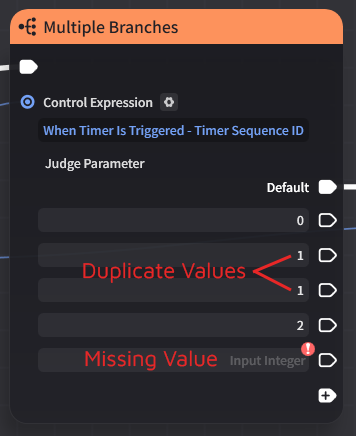
The Multiple Branches node isn't choosing any options.
- If there are any duplicate choices for Output Pins, or if any pins are empty, no choice will be selected, and execution will end at that node.
Make sure all values used as choices are unique, and that none are missing or empty.
¶ Navigation Indicator
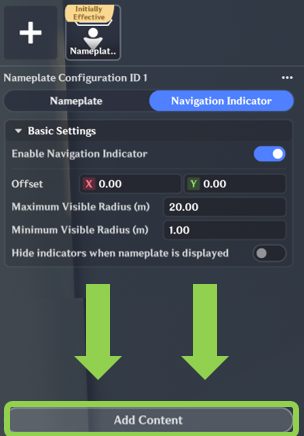
The navigation indicator isn't appearing.
- Navigation Indicators do not use your Nameplate settings. Once enabled, you must click the “Add Content” button at the very bottom of the menu to add and edit your desired indicator type.
¶ Timers
My timer isn't working even though Start Timer executes fine according to the Logger.
- Start Timer will silently fail if the first value in the
Timer Sequenceis effectively[2]0.00seconds or less. - If passing multiple values, each value must be non-negative and strictly increasing. For example, to start a timer that fires 3 times in
1.5second increments, the list must be[1.5, 3, 4.5], not[1.5, 1.5, 1.5]. If any values are effectively the same or less than any of the previous values, the timer will not start.
¶ When Custom Variable Changes
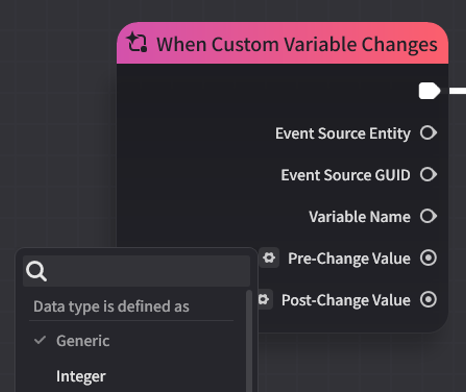
When Custom Variable Changes doesn't trigger at all.
- The
Pre-Change ValueandPost-Change Valueoutput pin types must match the type of the Custom Variable you want to listen to, or this node will not be triggered. This is the case even if the output pins are not connected to anything or being used elsewhere in your node graph.
¶ Other Notes
- The official documentation states that “Vessel-type” Custom Variables do not provide Pre-Change and Post-Change values, but this is incorrect. Container-type values (Lists, Structures, and Dictionaries) work perfectly fine [3]. However:
- This event will not be fired unless Set Custom Variable was used to change the value. Modifying the container by other means (e.g. Insert Value Into List, Modify Structure, etc.) will not trigger an event.
- The values provided are copies. Modifying them will not change the value stored in the Custom Variable.