¶ Editor Quirks
This page aims to collect editor behaviors that may seem odd or unintuitive.
Looking for contributors!
If you have information you think would be helpful to others, please consider adding it to the list below!
¶ Floating Point Numbers
-
Floating Point Numberinputs in the editor (e.g. An object's Location / Rotation / Zoom) are visually rounded to the nearest hundredth, or the second decimal place:0.0X). However, the true value can hold up to three decimals of precision (0.00X).-
This means you can type values such as
0.123into the editor to more precisely place objects, but be aware the editor will still not show this level of precision. -
Dragging objects in the viewport will not snap them to the "rounded" grid. This is particularly noticeable when adjusting decorations, as two decorations that both show a location of
0.01may actually be in different locations if the hidden decimal differs. For example:0.012~0.013will both display0.01in the editor.
-
-
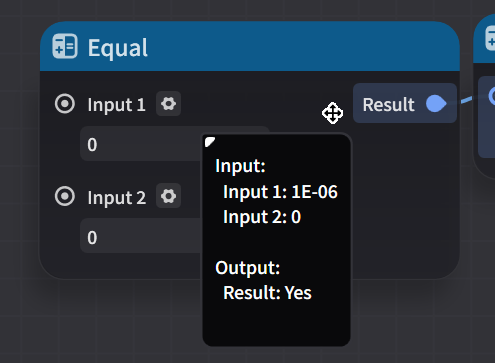
Floating Point Numbersin the Node Graph editor support arbitrary precision, but they may be visually rounded in input fields. Additionally, due to the Equal node using "fuzzy equality" when comparing floats, values that are close enough will be considered equal. (e.g.2.0000001 = 2)
¶ Timer Values
- All timer values appear to be rounded up to the nearest server tick[1] if it is not a multiple of one (e.g.
0.03,0.06, etc.). Then, an additional delay of 1 tick is incurred, making the minimum possible timer duration0.06, or 2 server ticks. This applies to all values except0.00or less, which are considered invalid in all cases, causing the timer to not start.[2]- For the purposes of this node,
Floating Point Numberprecision is limited to 3 decimal places, with the rest of the digits being truncated. This means0.12345 == 0.123(Need to verify with calculated values.) - Example Values:
Input Time Result Notes 0.030.060.03+0.030.0310.090.06 (rounded up)+0.030.030990.060.03 (truncated)+0.030.000990.00Timer fails to start with 0.00duration.
- For the purposes of this node,
Credits to Staeld for the analysis. Please let a Mentor on discord know if you notice any errors in these numbers.
¶ When Entity is Removed/Destroyed
- The official documenation states that node graphs on a Character Entity can receive both the When Entity is Destroyed and When Entity is Removed/Destroyed events when the character's HP reaches zero.
- This appears to be incorrect and not actually the observed case. These events will only be triggered on node graphs attached to the Stage Entity.[3]
- Node graphs on the character will still receive the When the Character is Down event when the player dies.